Budget App — PocketGuard
- 4.5
- Rating
- 100.00K
- Installs
- Free
- Price

 Analysis by App-foxy
I approached PocketGuard as someone who wanted a clearer answer to a simple question: after the bills are covered, what can I actually spend? That makes it more practical than a basic expense notebook. It is a finance app from PocketGuard, Inc. focused on bringing spending, income, recurring obligations, and saving decisions into one place. My first impression was that it is most useful when I treat it as a daily decision tool rather than a monthly report.
The app is free to install and is suitable for Everyone, although it includes in-app purchases ranging from $0.99 to $149.99 per item. It has been available since March 16, 2016, and the current version is 5.19.3 for devices running Android 8.0 or later. Its average rating is 4.5 from around 2.9 thousand ratings, while more than 100 thousand people have installed it. Those figures suggest a healthy level of interest, but the real question is whether its approach matches the way you manage money.
What PocketGuard feels like in everyday use
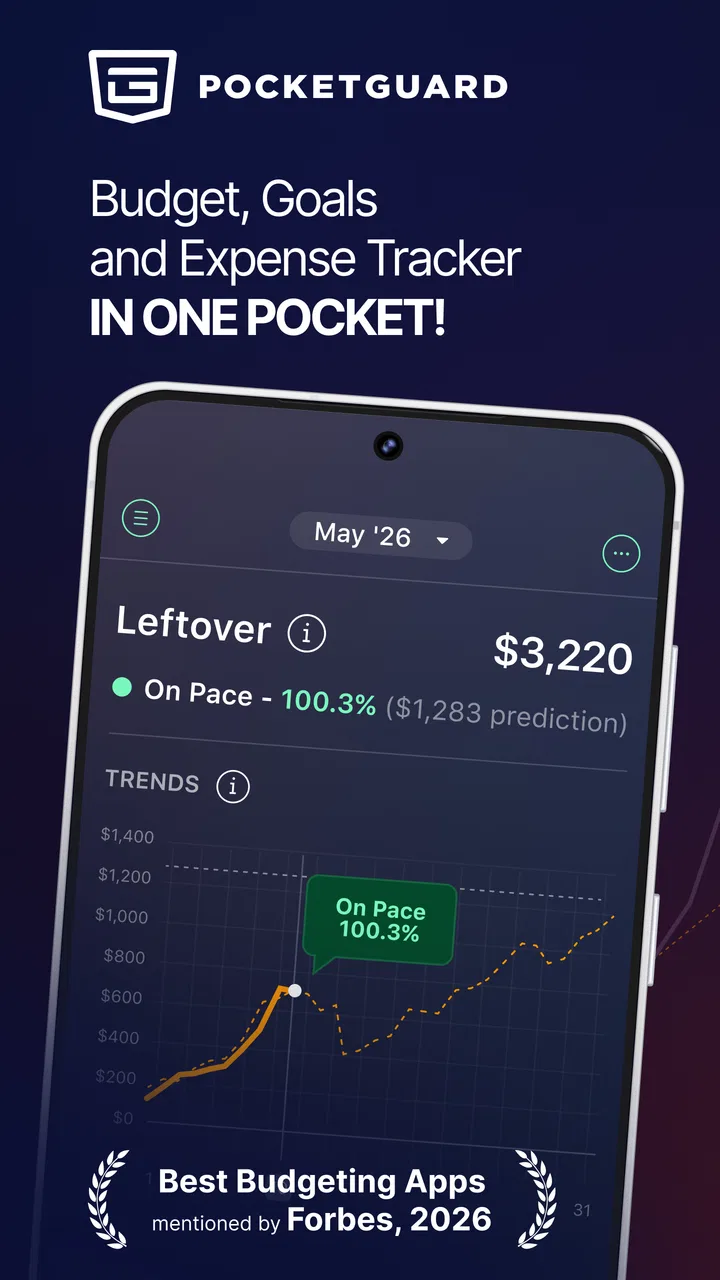
The central idea is easy to understand: organize the money coming in, account for expenses, and make the remaining amount easier to interpret. Instead of opening a banking app and mentally subtracting rent, utilities, subscriptions, groceries, and planned savings, I can use PocketGuard as a layer between raw transactions and an actual spending decision.
You May Also Like

 Blood Strike: 2.5 Anniversary
Blood Strike’s Loadouts Turn Every Drop Into a Tactical Gamble
A close look at Blood Strike’s custom loadouts: how fast access to signature weapons reshapes its battle royale rhythm, rewards preparation, and narrows the gap between fights.

 Pandora - Music & Podcasts
Pandora’s Music Is Easy to Start, but Harder to Recover
Pandora’s strength is its low-effort path from a seed to a station. Its weak spot is how much confidence it asks you to place in connection, setup, and quiet recovery.

 8 Ball Pool
 Is Built on Rivalries, Rematches, and Routine
A close look at the rivalries, rematches, shared routines, and unanswered safety questions that turn a quick pool match into a persistent mobile community.

 Samsung Music
’s Quiet Strength Is Playing What You Already Own
Its reach comes less from spectacle than from dependable access to a personal library. That simplicity is both the app’s strongest retention engine and its ceiling.

 AccuWeather: Weather Radar
AccuWeather Review: A Quick, Clear Forecast for Everyday Decisions
For everyday plans, the best forecast is the one you can understand quickly. AccuWeather makes rain timing, radar, and local conditions easy to act on, with a few trade-offs.

 Hill Climb Racing
Why Hill Climb Racing Still Turns Crashes Into One More Run
A tiny car, a bumpy hill and one more upgrade: Hill Climb Racing keeps resurfacing because its simple chaos makes every near-miss feel personal.
More From Our News Desk



That distinction matters. A bank app is usually excellent for showing what has already happened, but it rarely explains what a purchase means for the rest of the month. A spreadsheet can answer that question, but only if I maintain it carefully. PocketGuard sits between those two options. It aims to reduce the calculations I would otherwise do myself while still keeping the focus on everyday control.
I would not describe it as a complete financial planning system for every kind of user. Someone building a detailed investment plan, tracking a small business, or managing complicated shared finances may need a more specialized tool. For a person trying to stop wondering where the paycheck went, though, the simpler approach is a real strength.
The best way to judge the app is to give it a specific job. For example, I might use it before ordering takeout late in the month. Rather than checking my checking account balance and guessing, I first look at the upcoming obligations and the spending room left after those commitments. That small pause can prevent the common mistake of treating the current balance as entirely available.
Who will get the most from it
PocketGuard is a strong fit for a first-time budgeter who dislikes spreadsheets and wants a more visual way to understand cash flow. It can also help people whose income is regular but whose spending varies enough to create surprises. If you often reach the end of a pay period asking where your money went, the app gives you a place to turn that vague concern into categories and actions.
It is less convincing for someone who already has a carefully maintained spreadsheet with custom formulas, detailed household rules, and long-term projections. In that situation, the convenience of an app may not compensate for the control you would lose. I would also be cautious if your finances involve several people who need different views of the same money. A simple personal budgeting workflow is easier to keep accurate than a complicated shared arrangement.
Getting through the first setup without overcomplicating it
My advice is to resist the temptation to make the first session perfect. The meaningful goal is not to build a flawless financial archive. It is to create a useful picture of current income, regular expenses, and flexible spending. If I spend too long naming every possible category before seeing the main budget view, the setup starts to feel like work instead of help.
I would begin with the income that reliably reaches the account, then add the obligations that must be paid. Housing, utilities, debt payments, and recurring services deserve attention before optional purchases because they define the amount that is genuinely flexible. This ordering gives the app a better chance of answering the question I care about: what is safe to spend after the important commitments?
Recurring expenses deserve special care. A forgotten subscription can make an otherwise sensible budget look more generous than it is. I find it useful to scan a recent bank statement separately and write down every repeating charge before deciding what to keep. That is a practical workflow improvement: the app can organize the information, but I still need to notice whether a charge is essential, occasional, or no longer wanted.
Income that changes from month to month needs a conservative approach. I would rather enter a dependable baseline than assume the best month will repeat. If a bonus, freelance payment, or overtime amount is uncertain, treating it as guaranteed can make the spending guidance feel falsely reassuring. The app is only as useful as the assumptions behind its budget.
Another important setup decision is how often to review the information. I would not wait until the end of the month. A short check after a major payment and another before a larger discretionary purchase is more useful than one long session after the money has already disappeared. This turns PocketGuard into a habit of checking decisions, not merely a place where old transactions accumulate.
What the first useful result looks like
The first successful action is not simply installing the app or entering a category. It is using the resulting picture to change one real decision. Imagine that I have received my regular income and know that several bills are still ahead. I open PocketGuard before buying a new pair of headphones, review the commitments, and choose either to buy them within the remaining spending room or delay the purchase.
That moment is where the app earns its place on my phone. It converts budgeting from a vague promise into a decision made with context. Even if the result is “not today,” that is progress because I have replaced guesswork with a deliberate choice.
I also like the idea of using a small, repeatable target for the first week. Instead of attempting to cut every expense, I would identify one category that tends to drift, such as convenience food or impulse shopping. I can then check the app before spending in that category and see whether the choice fits the broader month. This is more realistic than expecting a complete lifestyle change immediately.
Saving money works better when it is connected to a reason. A general instruction to save more is easy to ignore, while a specific aim—building a cushion, preparing for an annual bill, or avoiding reliance on credit—gives the budget a purpose. PocketGuard can support that mindset by showing how current spending affects available room, but I still need to choose the goal and protect it from casual purchases.
Confusing moments and how I would handle them
The phrase “available to spend” can be misunderstood. I would not read it as permission to spend every remaining cent. It is a planning signal, not a replacement for judgment. Upcoming irregular costs, cash purchases, annual renewals, and social commitments can all reduce the amount that feels comfortable in practice.
This is why I would keep a short list of expenses that do not appear every week. Car maintenance, gifts, school costs, travel, and yearly memberships are easy to overlook when I focus only on recurring monthly charges. Before trusting the app’s everyday guidance, I would mentally test it against the next few weeks rather than relying on one attractive number.
Another possible source of friction is the difference between a transaction and a budget category. A single purchase may cover several purposes, and a refund may make recent spending look unusual. I would review questionable entries instead of immediately changing the whole budget. Small corrections are usually better than abandoning the system because one transaction does not look perfect.
Users should also understand the trade-off between automation and control. The appeal of PocketGuard is reducing manual work, but no automated overview can understand every personal intention. A payment may be necessary this month but optional next month; a transfer may not represent spending at all; a shared purchase may need to be split mentally. I would use the app for the broad picture and keep my own judgment for exceptions.
Privacy and account comfort are personal considerations too. Some people prefer connecting financial information for convenience, while others would rather enter figures manually or use a spreadsheet that stays entirely under their control. I would decide this before building the habit. If the connection method makes me uneasy, the most polished budgeting view will not feel useful enough to keep using.
How it compares with familiar alternatives
Compared with a bank app, PocketGuard offers a more interpretive experience. A bank app tells me the balance and lists transactions; PocketGuard is aimed at helping me understand spending in relation to income and obligations. I still need the bank app for authoritative account details, but I would use PocketGuard when deciding whether a purchase fits the month.
Compared with a spreadsheet, it can be less intimidating and faster for someone who does not enjoy formulas. A spreadsheet remains better for custom reporting, unusual income structures, and detailed household planning. The trade-off is that a spreadsheet demands discipline, while an app encourages more frequent, lighter check-ins.
Compared with a simple envelope method, PocketGuard is less physical and less deliberately restrictive. An envelope system makes limits feel concrete because money is assigned before it is spent. PocketGuard is more convenient for people who want an overview without maintaining separate envelopes, but users who need strong behavioral boundaries may prefer the firmness of that traditional approach.
Compared with a basic expense tracker, its value is not just recording what happened. The useful difference is connecting spending with the money that remains after planned commitments. If all I want is a diary of purchases, a simpler tracker may be enough. If I want help deciding what a purchase means for the rest of the month, this app has a clearer purpose.
Small habits that make the budget more trustworthy
I would schedule a weekly review that lasts only long enough to answer three questions: did income arrive as expected, did any recurring expense change, and is one spending category moving faster than planned? This is more sustainable than rebuilding the budget every day. It also catches errors while they are still easy to correct.
For irregular expenses, I would divide the expected annual cost into smaller amounts and treat that amount as part of the monthly plan. Even if I do the calculation outside the app, the habit prevents an annual bill from appearing as a complete surprise. This is one of the less obvious ways to improve the app’s usefulness: the tool can reflect a plan, but I have to create the plan for expenses that do not arrive on a regular schedule.
I would also separate “can afford” from “should buy.” PocketGuard may help show that money is available, but it cannot decide whether a purchase supports my priorities. Before a larger discretionary expense, I would ask whether it affects a bill, a savings goal, or next week’s flexibility. That extra question keeps the app from becoming an excuse to spend simply because the current view looks comfortable.
When a month goes badly, I would avoid deleting the budget or starting over emotionally. Instead, I would identify whether the problem came from an underestimated bill, an unplanned event, or a category that needs a more realistic limit. A budget is useful when it teaches me what to change next time, not when it pretends every month will be identical.
Where the free starting point fits
The free installation makes it reasonable to test the basic workflow before deciding whether the app belongs in my routine. I would spend enough time with real income and expenses to see whether the overview changes my decisions, rather than judging it after a brief glance. The presence of in-app purchases means I would pay attention to which parts of the experience require an upgrade and whether those additions solve a problem I actually have.
I would not pay merely because a premium option appears during setup. First I would ask whether I am checking the app consistently, whether the available view is helping me avoid mistakes, and whether a paid feature would remove a genuine obstacle. If the answer is no, the free starting point is sufficient for evaluating the concept.
Device compatibility is straightforward for many users because the app supports Android 8.0 and later. Still, anyone using an older phone should check compatibility before planning around it. On a supported device, I would keep the app accessible enough to open before common spending moments, because an excellent budget that I never consult has no practical value.
My recommendation after using the workflow
I recommend PocketGuard to people who want a calmer answer to “can I afford this?” without maintaining a detailed spreadsheet. Its strongest quality is the way it encourages me to look beyond the current account balance and consider income, obligations, and flexible spending together. That is especially helpful during the first few months of learning how to budget.
I would skip it if I need advanced financial modeling, highly customized reports, or a system designed around complex shared finances. In those cases, a spreadsheet or a more specialized money-management tool may provide better control. I would also skip it if I am unwilling to review transactions and correct assumptions; no budgeting app can rescue a plan built from incomplete or unrealistic information.
For a first-time user, my suggested path is simple: set up dependable income, enter the bills that shape the month, check the result before one real discretionary purchase, and review the categories once a week. That sequence produces a meaningful success quickly without demanding perfection. After that, I would add irregular expenses and refine the plan based on actual behavior.
My final view is that PocketGuard works best as a practical spending checkpoint, not as a complete answer to every financial question. It gives beginners a clearer starting structure than a blank spreadsheet and more context than a normal bank balance. If I use it honestly, question its assumptions, and connect it to a specific saving or spending goal, it can make everyday money decisions feel less uncertain.
FAQs for Budget App — PocketGuard
01What is PocketGuard, and how does it help with budgeting?
PocketGuard is a personal finance and budgeting app designed to give you a clearer view of your income, expenses, bills, and available spending money. After connecting eligible financial accounts, it organizes transactions and estimates how much you can safely spend after recurring bills, savings goals, and planned expenses. It is especially useful for people who want a quick overview rather than building a detailed budget from scratch.
02Is PocketGuard safe to use with my bank accounts?
PocketGuard uses account connections to import financial information and display it in one place, so security is an important consideration before downloading it. The app may rely on third-party financial data connection services, and the exact institutions supported can vary by country. Before linking an account, review PocketGuard’s current privacy policy, security information, permissions, and supported-bank list, and avoid sharing your banking password anywhere outside the official connection screen.
03Does PocketGuard cost money, or is there a free version?
PocketGuard’s availability and features can differ between its free and paid plans, and pricing may also vary by platform, region, or promotion. Basic budgeting and account-overview tools may be available without a subscription, while advanced features can require PocketGuard Plus or another premium option. Check the current App Store or Google Play listing carefully, including trial terms, renewal dates, and cancellation instructions, before starting a subscription.
04Can PocketGuard automatically track bills, subscriptions, and spending?
PocketGuard can help organize imported transactions and identify recurring expenses, making it easier to notice bills, subscriptions, and regular spending patterns. However, automatic categorization is not always perfect, particularly when merchants use unusual names or when transactions are pending. I recommend reviewing categories and recurring payments regularly instead of relying on the app completely, especially if you use several accounts, cash, or financial services that do not connect automatically.
05Who should download PocketGuard, and what are its limitations?
PocketGuard is a good choice for users who want a simple snapshot of their finances, an estimate of available spending money, and help identifying unnecessary recurring expenses. It may be less suitable for people who need highly customized categories, detailed investment tracking, shared household budgeting, or complete manual control over every transaction. Account-support limitations, subscription costs, synchronization delays, and occasional categorization errors are also worth considering before making it your primary budgeting tool.
Pros
- Simple interface makes daily spending easy to monitor.
- Automatic transaction categorization reduces manual budgeting work.
- Spending limits help prevent overspending before bills are due.
- Useful alerts highlight unusual charges and upcoming payments.
- Syncs with many bank accounts for a broader financial overview.
Cons
- Some useful budgeting tools require a paid subscription.
- Bank connections may occasionally need to be refreshed.
- Limited customization for users with complex budgeting methods.
- Automatic categories can require occasional manual corrections.
- Availability and features may vary by country and financial institution.

Budget App — PocketGuard
Gallery